Sotwe: The Best Free Way to View X (Twitter) Without an Account in 2026
Updated: June 17, 2026
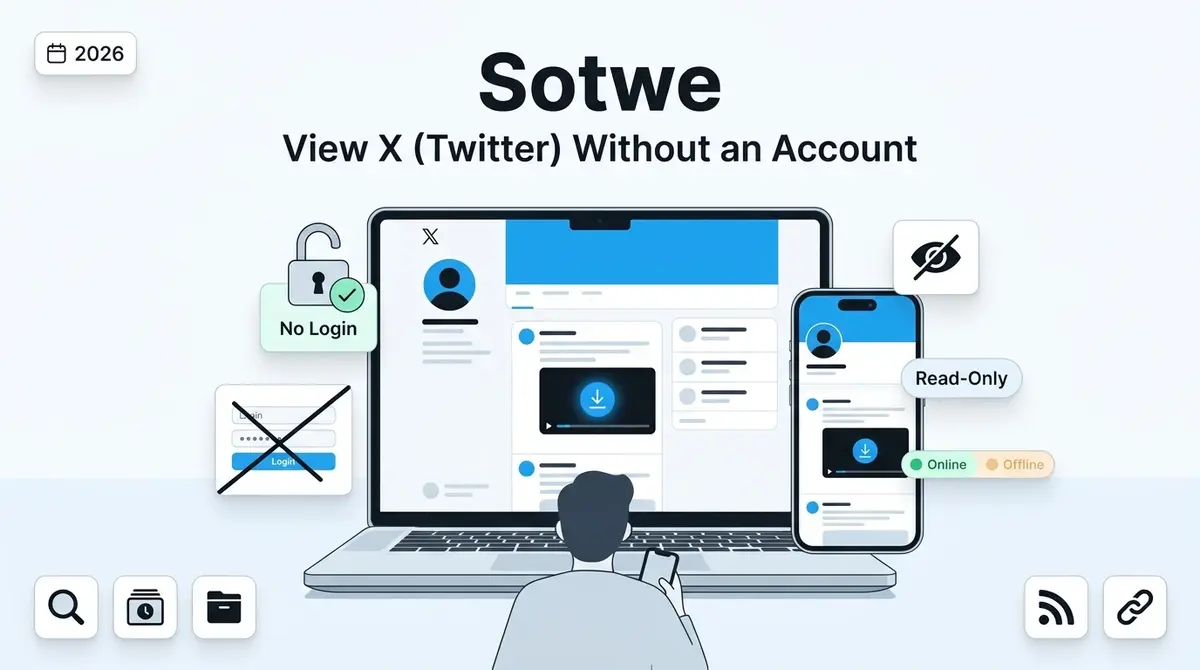
Quick Answer: Sotwe is a free web-based viewer that displays public X (formerly Twitter) profiles, tweets, and media without requiring a login. Type any public username, and the tool fetches recent posts in a clean, scrollable layout. It cannot access private accounts, and availability may shift depending on X Corp’s current data policies.
You want to read a tweet but X forces you to log in first. That login wall wastes your time and tracks your activity. Sotwe removes both problems instantly. This free web viewer pulls public X content so you can browse profiles and posts without creating an account or sharing personal data.
What Is Sotwe and How Does It Actually Work?
Sotwe is a third-party X viewer that fetches publicly available tweets and profile data from the platform. You enter a handle or keyword, and the tool displays recent posts in a simplified, ad-light interface. No registration, no email, and no app download required.
The platform reads from X’s public data layer and reorganizes the output into a scrollable feed. It operates in strict read-only mode, meaning you cannot post, like, reply, or send direct messages through the viewer.
When X restricted unauthenticated access in mid-2023, tools like this filled a gap for millions of casual readers who refused to create accounts just to read public conversations (The Verge, 2023).
Why Do People Search for Sotwe in 2026?
Privacy and convenience drive most searches. Journalists, students, and everyday readers want to check public X discussions without linking their real identity to a browsing session.
Others use the viewer during temporary X outages or login glitches. When the official platform stutters, third-party viewers often see sharp traffic spikes as users scramble for access.
Common reasons people look for this X viewer:
- Reading public tweets without creating an account
- Checking trending conversations and hashtags quickly
- Researching public figures or brand accounts anonymously
- Bypassing the X login wall on shared or public devices
- Following live event coverage without algorithm distractions
How to View X (Twitter) Profiles With Sotwe Step by Step
Getting started takes less than thirty seconds. Follow these steps on any device with a modern web browser:
- Open the Sotwe homepage in Chrome, Safari, Firefox, or Edge.
- Type the exact X handle you want to explore (for example, @NASA or @BBCBreaking) into the search bar.
- Press enter or tap the search icon to load the profile.
- Scroll through recent public tweets, replies, and pinned posts.
- Click any attached image, video, or GIF to view or download the media file directly.
The layout mirrors a standard X profile page, so navigation feels familiar from the very first click. No settings to configure and no permissions to grant.
Is Sotwe Safe to Use Right Now?
The tool only accesses publicly available data, which means it does not hack, scrape private accounts, or bypass X’s privacy controls. According to cybersecurity guidelines from Kaspersky, tools that read public data without requesting your credentials carry minimal personal risk.
You never enter a password, email address, or phone number. That alone eliminates the biggest threat vector associated with third-party social media tools.
Safety habits to follow regardless:
- Never share your X credentials with any external website.
- Stick to HTTPS connections at all times.
- Avoid clicking pop-up ads that may appear on free viewer sites.
- Clear your browser cache and cookies after each session.
- Use a reputable ad blocker for an extra layer of protection.
Does Sotwe Still Work in 2026?
Availability fluctuates. The viewer depends entirely on X Corp’s willingness to allow third-party access to public data streams. When X tightens its API policies or issues legal takedown notices, tools in this category can go offline without warning.
As of mid-2026, the platform experiences intermittent downtime. Some days it loads profiles within seconds; other days it returns blank results or timeout errors. This inconsistency is not unique to this viewer — nearly every third-party X tool faces the same pressure.
If the site fails to load, wait a few hours and try again. X’s rate limits often reset on a rolling basis, restoring access after temporary blocks.
Why Sotwe May Stop Loading and How to Check
Several factors can cause the viewer to fail. The most common is X’s aggressive rate limiting on unauthenticated data requests, which has intensified since the platform’s rebrand.
Frequent causes of downtime:
- X Corp API restrictions and legal cease-and-desist actions
- Server overload during high-traffic news events
- Regional ISP blocks in certain countries
- Outdated browser cache serving stale pages
- Temporary IP-level bans from unusual traffic patterns
Quick diagnostic steps before giving up:
- Switch from Wi-Fi to mobile data (or vice versa).
- Open the viewer in an incognito or private browsing window.
- Clear your browser cache and reload the page.
- Check Reddit or X itself for real-time outage reports from other users.
- Try accessing an archived version through the Wayback Machine.
If none of those steps restore access, the platform is likely down for everyone temporarily.
Sotwe vs X (Twitter): Key Differences Explained
The core difference comes down to interaction versus observation. X gives you a full social media toolkit. This viewer gives you a read-only window into public content.
| Feature | Sotwe | X (Official Platform) |
| Login Required | No | Yes |
| View Public Profiles | Yes | Yes |
| View Private Accounts | No | Yes (if approved) |
| Post Tweets | No | Yes |
| Like and Reply | No | Yes |
| Send Direct Messages | No | Yes |
| Download Media | Yes (built-in) | No native option |
| Ad-Free Browsing | Mostly | No (unless Premium) |
| Algorithmic Feed | No (chronological) | Yes |
| Cost | Free | Free / Premium |
| Uptime Reliability | Inconsistent | High |
For pure content consumption — reading threads, checking profiles, saving images — the viewer often feels faster and cleaner. You skip the algorithmic “For You” feed entirely and see posts in chronological order.
Can You Download Videos and Media From This X Viewer?
Yes. The platform includes a built-in media downloader for images, GIFs, and video clips attached to public tweets. Click the download icon next to any media file, choose your preferred resolution, and save it directly to your device.
Supported media types:
- MP4 video clips in multiple resolutions
- JPEG and PNG images at original quality
- Animated GIFs
- Thread screenshot captures
This feature eliminates the need for separate download extensions. You get a complete X media viewer and saver in a single browser tab.
Sotwe Alternatives That Actually Work in 2026
The landscape has shifted dramatically. X Corp issued aggressive legal cease-and-desist orders throughout 2025 and early 2026, shutting down most Nitter instances and several other popular viewers. The open-source Nitter ecosystem is now largely archived and non-functional.
Here are the options that still deliver results as of June 2026:
1. Google Search with Site Filters
Type site:x.com “username” into Google. Search results often display recent tweets directly in the snippet, and clicking through may load a cached preview without requiring login.
2. Wayback Machine (Archive.org)
Paste any public X profile URL into the Wayback Machine to browse historical snapshots. This method works best for older tweets and deleted content that no longer appears on the live platform.
3. Thread Reader App
Paste a tweet thread URL into Thread Reader App to unroll long conversations into a single readable page. It works reliably for public threads and does not require an X account.
4. Embedded Tweet Links on News Sites
Many publishers embed X posts directly in their articles. If you search for a specific tweet topic on Google News, you can often read the full text within the article without visiting X at all.
5. Self-Hosted RSS Bridges
Tech-savvy users can deploy RSS-Bridge on a personal server to generate feed subscriptions for public X accounts. This method requires technical setup but offers the most consistent long-term access.
What to Do When Sotwe Goes Offline
Downtime is a reality for every third-party X viewer in 2026. Having a backup plan keeps you from hitting a dead end during breaking news events or time-sensitive research.
Immediate steps:
- Wait 30 to 60 minutes and refresh. Rate limits often reset quickly.
- Switch to one of the alternatives listed above.
- Try accessing the viewer from a different network or country via VPN.
- Check the platform’s social media channels for maintenance announcements.
Keeping two or three methods in your toolkit ensures you always have a way to read public X content, regardless of which tool happens to be down.
Sotwe Limitations Every User Should Know
Transparency matters. Before you rely on this viewer for daily browsing, understand its hard boundaries:
- Private accounts stay hidden. The tool respects X’s privacy settings and cannot unlock protected profiles. Any site claiming otherwise is misleading you.
- No interaction features. You cannot tweet, like, retweet, reply, or message anyone through the viewer.
- No guaranteed uptime. X Corp controls the data pipeline. Policy changes can disable the tool overnight.
- Delayed or missing data. Very old tweets (beyond a few years) may not appear, and real-time results can lag by several minutes during peak traffic.
- Ad presence. While lighter than X’s official feed, the free viewer may display third-party advertisements to cover hosting costs.
- No analytics dashboard. You cannot access impression counts, audience demographics, or engagement metrics beyond what X displays publicly on each post.
According to X’s official developer documentation, public tweet data is accessible through defined endpoints, and third-party viewers operate within this publicly available layer. That access can change at X Corp’s discretion.
Frequently Asked Questions
What is Sotwe used for?
Sotwe lets you view public X (Twitter) profiles and tweets without logging into an account. You search a username, and the tool displays recent posts in a clean, scrollable layout. You cannot interact with the content.
Is Sotwe legal to use?
The viewer displays publicly available content, which makes it legal in most regions. Its functionality depends on X’s data access policies, and availability may change if X restricts third-party access further.
Can Sotwe view private X accounts?
No. The tool respects X’s privacy controls and only shows content from public profiles. Protected accounts remain completely hidden. Any website claiming to unlock private profiles is not trustworthy.
Why is Sotwe not working today?
X Corp’s API restrictions and rate limits are the most common cause. Server outages, regional blocks, and browser cache issues can also prevent the viewer from loading. Try clearing your cache or switching networks.
Does Sotwe require a Twitter or X account?
No account is necessary. The viewer fetches public data directly, so you never enter credentials, email addresses, or phone numbers.
Is my browsing history visible to others when I use Sotwe?
The platform does not store your search queries on its servers. Your activity remains private on the tool’s side. Clear your local browser history for complete discretion.
Start Browsing X on Your Own Terms
You now know exactly how to read tweets, explore profiles, and download media without handing your personal data to X. Whether you are a journalist verifying a source, a student researching public opinion, or a curious reader following a trending topic, this viewer puts the open web back in your hands.
Bookmark the Sotwe homepage, run your first anonymous search, and keep the backup alternatives ready for days when the platform goes dark. Your privacy is worth protecting — start browsing smarter right now.
Keep Reading

Techtrendery.com usa Review: 5 Honest Findings From a Full Content Audit

What Does Babybelletje Mean? The Dutch Word Explained (Cheese vs. Pregnancy Bell)

Lori Harvey: The Entrepreneur Building Her Own Legacy

Doctor Sleep: The Complete Guide to Stephen King’s Chilling Sequel to The Shining
What Is Nerwey? The Truth Behind the Trending Term (2026)