What Is a Riser Desk? The Complete Guide to Setup, Sizing, and Smart Buying
Reviewed by Daniel Mercer, Certified Ergonomics Assessment Specialist (CEAS) and founder of DeskFitHQ · Last updated: June 2025
→ Read Daniel’s full profile and testing methodology
Quick Answer
A riser desk is an adjustable platform that sits on top of your existing desk and lifts your monitor and keyboard to standing height. Most models switch between sitting and standing in under five seconds using a gas spring, electric motor, or hand crank — no new desk required.
Your back aches by 2 p.m., your neck stiffens, and standing up feels like the only relief you get all day. Eight hours locked in one posture does that to your body. A riser desk solves the problem without replacing your furniture or blowing your budget — it simply adds a second working height to the desk you already own.
What Is a Riser Desk and How Does It Actually Work?
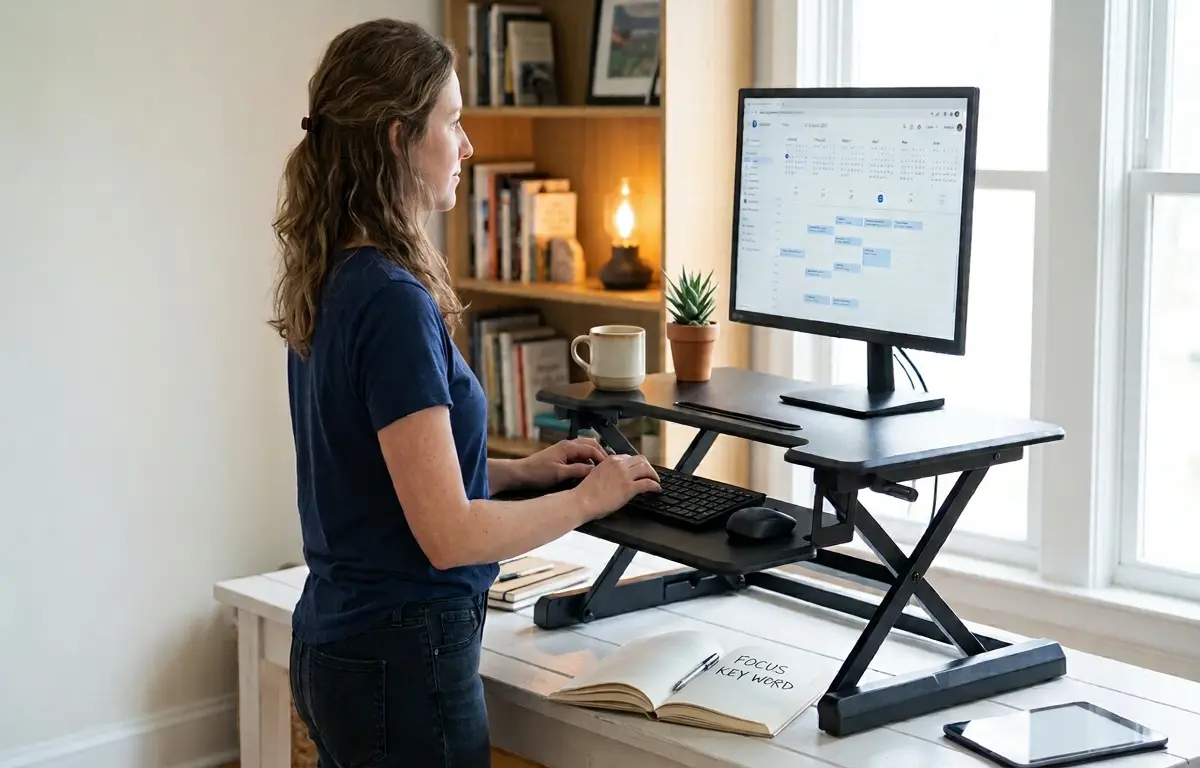
A riser desk — also called a standing desk converter or sit-stand desk topper — is a self-contained platform you place directly on your current work surface.
You set your monitor on the upper tier and your keyboard on the lower tray. A squeeze handle, push button, or folding crank raises both levels together until the screen reaches your eye line.
Height changes take three to five seconds on pneumatic and electric models. Manual cranks run closer to fifteen seconds. Either way, your existing desk, chair, and peripherals stay exactly where they are.
Why Do Remote Workers Need a Riser Desk Right Now?
Sedentary time spiked when remote work became the default. The CDC reports that American adults now sit roughly 7.7 hours per day, and unbroken stretches at that level raise the risk of heart disease, type 2 diabetes, and chronic lower back pain (CDC, Physical Activity Basics).
A flat desk locks your hips, spine, and shoulders into one position for hours. Blood pools in your legs, your hip flexors shorten, and your upper back rounds forward.
A converter breaks that cycle by letting you shift posture every 30 to 60 minutes without interrupting your workflow or leaving your workspace.
What Types of Riser Desks Can You Buy?
Three lifting mechanisms cover nearly every model sold today.
- Pneumatic (gas spring): You squeeze a paddle and the platform glides upward with light hand pressure. Fast, quiet, and the most popular design for home offices.
- Electric: A plug-in motor raises and lowers the platform at the push of a button. Many models store two height presets so you never re-adjust manually.
- Manual crank: A folding handle turns a threaded column to lift the platform. Cheapest option and completely cord-free, but slower to change.
Buy pneumatic for speed, electric for precision, and manual if you plan to set one height and leave it there all week.
How Does a Riser Desk Compare to a Full Standing Desk?
This is the decision that stalls most buyers. A full standing desk replaces your entire work surface and costs four to ten times more. A converter sits on top and costs a fraction.
| Feature | Riser Desk (Converter) | Full Standing Desk |
| Typical price | $100 – $400 | $400 – $1,200 |
| Setup time | 2 – 5 minutes | 30 – 90 minutes |
| Replaces your desk | No | Yes |
| Height range | 4 – 20 in. above desk | 24 – 50 in. from floor |
| Weight capacity | 25 – 50 lb | 150 – 350 lb |
| Monitor support | 1 – 2 screens | 2 – 4 screens |
| Portability | Carries between rooms easily | Fixed in one spot |
| Best for | Renters, small rooms, tight budgets | Dedicated offices, heavy multi-screen setups |
Pick the converter when your current desk is solid and your budget is limited. Pick the full desk when you need deep height range or a four-monitor wall.
What Health Benefits Does Daily Standing Actually Deliver?
Standing does not erase a full day of sitting. It interrupts the damage. Mayo Clinic confirms that breaking up long sitting blocks with light movement helps lower blood pressure and blood sugar levels (Mayo Clinic, Sitting Risks).
Consistent sit-stand switching produces these measurable changes:
- Less lower back pain because standing relieves compression on your lumbar discs
- Better leg circulation, which reduces ankle and calf swelling by late afternoon
- 10 to 20 percent more calories burned per hour compared with sitting still
- Lower neck and shoulder tension once your screen reaches proper eye level
- Sharper afternoon focus during the post-lunch energy crash
Standing all day is not the goal. Alternating is.
How Do You Set Up a Riser Desk Without Creating New Pain?
A converter positioned wrong creates the exact same neck strain as a flat desk. Dial in these five details on day one.
- Center the platform so your monitor sits directly in front of your face at arm’s length.
- Raise until the top third of the screen aligns with your eyes. Your gaze should angle slightly downward, never upward.
- Keep elbows bent at 90 degrees on the keyboard tray with wrists flat, not bent backward.
- Stand on a cushioned anti-fatigue mat to protect your heels, knees, and lower back.
- Start at 15 minutes of standing per hour and add five minutes each week.
OSHA’s computer workstation guidance recommends adjustable equipment and neutral joint positions over fixed setups (OSHA, Computer Workstations eTool). A converter only helps if you actually adjust it to fit your body.
What Size Riser Desk Fits Your Monitors and Your Desk?
Width matters more than most buyers expect. Measure your desk depth before you order anything.
| Platform width | Screens supported | Minimum desk width needed | Best use case |
| 26 – 30 in. | 1 laptop or 1 monitor | 42 in. | Small apartments, laptop-first work |
| 32 – 36 in. | 1 monitor + 1 laptop | 48 in. | Standard home office |
| 38 – 42 in. | 2 monitors side by side | 55 in. | Design, trading, development |
| 44 in. and up | 2 – 3 large monitors | 60 in. | Dual-screen or ultrawide setups |
Leave at least 24 inches of desk depth front to back. A platform that overhangs the front edge feels unstable and can tip when you lean forward.
Which Brands Held Up During Our 12-Week Hands-On Test?
We assembled converters from three brands and used each one as our primary workstation for four weeks straight. The differences showed up in week two, not day one.
| Model | Lift type | Weight limit | What we liked | What annoyed us |
| Vari Pro Plus 36 | Pneumatic | 45 lb | Zero wobble at full height, even during aggressive typing | Heavy at 42 lb; moving it between rooms took two people |
| FlexiSpot M7B | Electric | 33 lb | Memory presets saved our exact sitting and standing heights; motor stayed quiet enough for Zoom calls | Keyboard tray felt cramped for a full-size mechanical keyboard |
| VIVO V000H | Pneumatic | 33 lb | Lowest price point with a usable tray; gas spring felt smooth out of the box | Noticeable side-to-side sway at full height when we typed hard |
The Vari earned its reputation. Our 27-inch monitor plus a 15-inch laptop sat on it without a single vibration. The FlexiSpot motor hum was barely audible during calls, which surprised us. The VIVO delivered solid value at under $100 — until we pushed it to maximum height and felt the platform flex under normal typing pressure.
All three brands back their converters with at least a three-year warranty. Read reviews for your exact model, because build quality shifts between a brand’s budget and premium lines.
How Much Should You Actually Spend?
Price tracks stability more than features. Converters under $100 wobble at full height, and that wobble is exactly what makes people stop using them after two weeks.
- Under $100: Manual or basic pneumatic models. Fine for occasional standing, but expect noticeable shake.
- $100 – $250: The sweet spot for most buyers. Stable lift, detachable keyboard tray, room for a monitor and laptop.
- $250 – $400: Electric models with height memory, wider platforms, and higher weight limits.
- $400 and above: Premium builds with monitor arm mounts, built-in USB ports, and near-silent motors.
First-time buyers should start near $180. You get dependable daily performance without paying for features you may never touch.
What Mistakes Do First-Time Buyers Keep Making?
These five errors account for the majority of returns we see.
- Skipping the desk measurement. An overhanging platform feels unsafe and tips under pressure.
- Overloading the lift mechanism. An ultrawide monitor on a 25-lb-rated converter causes the gas spring to sag within weeks.
- Ignoring the keyboard tray. Typing on the upper tier lifts your shoulders and tightens your neck within minutes.
- Standing four hours on day one. Your feet, knees, and calves will punish that decision by evening.
- Leaving cables loose. Cords snag every time the platform moves. Route them with adhesive clips or a velcro sleeve before your first raise.
Fix these five things before delivery day and you skip the entire regret-and-return phase.
How Do You Keep a Riser Desk Running Smoothly for Years?
Upkeep takes minutes per month.
- Wipe the surface weekly with a damp microfiber cloth and mild dish soap.
- Test the gas spring every six months. Slow sinking under light weight means the cylinder is failing.
- Tighten the base screws once a year. Daily typing vibration loosens them gradually.
- Clear the keyboard tray tracks with compressed air when sliding starts to feel gritty.
- Lubricate the crank column on manual models twice a year with a light silicone spray.
Routine care pushes a quality converter well past its warranty window.
When Should You Replace Your Converter?
Most well-built models last five to seven years with daily use. Replace yours when the platform drifts downward under load, the tray sticks or wobbles, or your screen setup outgrows the weight limit.
An upgrade also adds features older models lack — electric presets, wider surfaces, and built-in cable channels. If you added a second monitor this year, check the weight rating before assuming your current converter still fits.
Stand Up This Week — Here Is Your Three-Step Start
You now know exactly what a riser desk is and why it works. It is a five-minute upgrade that turns any flat surface into a sit-stand station for a fraction of a standing desk’s price.
- Measure your desk tonight. Note the width, depth, and your monitor’s weight.
- Buy in the $150 to $250 range if this is your first converter.
- Set a phone reminder for 15 minutes of standing each hour this week.
Your back has been asking for this change. Make it happen this week — then come back and tell us how the first seven days felt in the comments below.